French I – Children’s Audiobooks

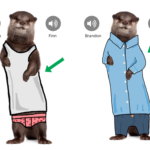
This fall, French I has been taught orally. The students have not picked up a pencil in class since September. They are learning to speak French in an authentic way. Two years ago, Mr. Crofton helped the FLEX class to produce funny videos featuring animals decked out in all kinds of clothing. The students wrote descriptive sentences and recorded themselves. That project went well. This year’s group wrote nothing but they recorded themselves “reading” the text-less book, in a manner similar to a child’s picture book.

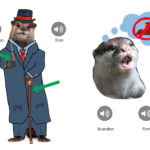
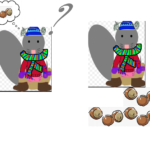
The books produced were fun and funny. They featured a dapper otter, a neat bear cub putting away his clothes, an over-dressed, hungry gray squirrel and a sleepy fawn getting ready for bed. But the best part of the project were the audio components. The students did not read the text; instead they told the story. Their pronunciation was not always perfect but their words were perfectly understandable. The vocabulary learned and retained through this project has been impressive.

Ms. Reedy, French Teacher

You can download two of the ebooks complete with embedded audio from these links: L’ours et Son FrereLuther la Loutre. They work best when read in the iBooks app on Mac or iPad.

Posted in Tech in the Classroom | Comments Off on French I – Children’s Audiobooks

French III – Prison Escape Video Guides

During the fall trimester, the French III students read an excerpt from Dumas’ classic, The Count of Monte Cristo. In the story, the hero, Edmond Dantès, is wrongfully imprisoned in the island fortress, Chateau d’If. With the help of a “crazy” priest, Dantès escapes from the island and sets off to find the fortune that awaits him on Monte Cristo. Back in Maine, the students fittingly researched famous francophone prisons. But, now the fun began….

Each student, once familiar with his or her particular prison, prepared a “How to get out of jail” video. Why? To practice the imperative, of course! The students learned how to write formal written commands. This form is used on information bulletins or safety notices: for example, “Keep your eyes closed during an eclipse”. Mr. Crofton taught them how to use the App “Explain Anything”. The finished projects were not just informative; they were humorous as well! The videos featured oral and written text as well as instances of animation.

Will these videos be helpful to the inmates? Probably not, but the students certainly learned a lot from this experience.

Ms. Reedy, French Teacher

Posted in Tech in the Classroom | Comments Off on French III – Prison Escape Video Guides

Foreign Language Technology Project Ideas

As a follow up to our focus on technology integration at the department level, and after meeting with all department heads, below are detailed a number of technology project ideas (using either the iPads, the computer labs or the 3D printer) specific to your department. It is our hope that at least one of these ideas might inspire you as you plan out your courses for the rest of the year.

1. Online writing, reading and speaking portfolios, either as a classroom style blog with comments and discussion or individual writing portfolios that is updated throughout the year. The two main options for this kind of online site is through either an official Hebron Academy WordPress blog or through the the student’s own Google Apps Blogger account. Another option for this is also a personal Google Site, but the key is the ability to embed text, images, audio and video to demonstrate their learning and improvement over a period of time.

2. Using Google My Maps to create custom maps of cultural and political events. Students can create their own maps with points of interest, images, text and directions. Here are the detailed steps for creating a Google My Maps: http://www.educatorstechnology.com/2015/08/excellent-google-maps-tutorials-for-teachers.html. And you can see some examples made by our middle school last year here: https://blogs.hebronacademy.org/technology/2016/04/22/grade-6-google-maps-ski-trip/.

3. And you can take the map projects examples to the next level by using Google Street View (https://www.google.com/streetview/) of foreign countries and cities. You could create all kinds of videos, presentations and guides using screenshots of Google Street View images and directions.

4. One project that could be used in most classrooms is the student creation of an interactive textbook using either the iPad app Book Creator (https://itunes.apple.com/us/app/book-creator-for-ipad/id442378070?mt=8) or iBooks Author (http://www.apple.com/ibooks-author/) in the library computer lab. iBooks Author is the app Trevor used to create his writing textbook. Students could create these for themselves as study guides or for younger students and they can contain all types of media, graphics, audio and video.

5. Creating more creative document types, which contain en element of design. Students have to create their own layouts, with different fonts, images, shapes, etc to piece together their document. We have created these types of projects using PowerPoint and Book Creator already but there is a selection of other apps and tools we could use as well, such as Storybird (https://storybird.com/create/) or LucidPress (https://www.lucidpress.com).

6. Choose the path narrative stories, using Keynote and the internal link feature to add buttons, or a web tool like Inkle Writer (http://www.inklestudios.com/inklewriter/). Students have to write the multi-path story and then create the links and narrative choices so that a reader can progress through the story.

7. Book trailers. This is a great video project where students create a movie trailer style film based around a book they have been reading complete with over the top sound effects and voice over. Here are some middle school examples (in English but they could be in any language) from my previous school that came out pretty well: https://techois.wordpress.com/2014/02/25/grade-6-book-trailers/

8. There are also other ways to using video in the MFL classroom, and one that I have seen work well is using animation techniques like stop motion or frame-based to create visual representations of the books or writing they have been studying. We have done a lot of stop motion projects with the middle school (https://blogs.hebronacademy.org/technology/?s=stop+motion+) and for frame-based animation we would use this app on the iPads: https://itunes.apple.com/us/app/animation-drawing-by-do-ink/id364762290?mt=8

9. Interviews/podcasts/recordings using AudioCopy or GarageBand. This could be as simple as recording scripted conversations or role plays and then editing them for errors, or creating complete radio shows with professional postproduction including a soundtrack, sound effects, etc. This presentation gives a good overview of podcasting in the classroom: https://docs.google.com/presentation/d/1lRc8rAVVNR61VR6JnEhspH84W93vNZ8VMX
6GL3Lmo4U/present?slide=id.g838051e1d_2_3

10. Creation of historical artifacts, buildings and archeological sites in 3D. Using modeling tools like SketchUp, Tinkercad and Sculptris students are able to create all kinds of 3D shape and objects that can then be printed in physical form. Multiple objects can be created and then positioned together to create more detailed models, for display or presentation. Here is a good overview of what has been done with our 3D printer so far: https://blogs.hebronacademy.org/technology/2016/10/21/3d-printer-update/

Posted in Professional Development | Comments Off on Foreign Language Technology Project Ideas

English Technology Project Ideas

As a follow up to our focus on technology integration at the department level, and after meeting with all department heads, below are detailed a number of technology project ideas (using either the iPads, the computer labs or the 3D printer) specific to your department. It is our hope that at least one of these ideas might inspire you as you plan out your courses for the rest of the year.

1. Online writing portfolios, either as a classroom style blog with comments and discussion or individual writing portfolios that is updated throughout the year. The two main options for this kind of online site is through either an official Hebron Academy WordPress blog or through the the student’s own Google Apps Blogger account. The best example of this is the AP Lit poetry blog I helped Emily create a couple of years ago: https://blogs.hebronacademy.org/aplit/

2. Creating more creative document types, which contain en element of design. Students have to create their own layouts, with different fonts, images, shapes, etc to piece together their document. We have done this with the Freshmen newspaper project with restricted design rules and the Pages app but there is a selection of other apps and tools we could use as well, such as Storybird (https://storybird.com/create/) or LucidPress (https://www.lucidpress.com).

3. Choose the path narrative stories, using Keynote and the internal link feature to add buttons or a web tool like Inkle Writer (http://www.inklestudios.com/inklewriter/). Students have to write the multi-path story and then create the links and narrative choices so that a reader can progress through the story.

4. I have mentioned this workflow before during tech PD sessions but using the MindNode app to brainstorm and plan out a paper and then convert this into an outline to form the basic structure of final document. This image gives an idea of what a final outline can look like: https://abramkj.files.wordpress.com/2015/07/mind-map-with-outline.png

5. Book trailers. This is a great video project where students create a movie trailer style film based around a book they have been reading complete with over the top sound effects and voice over. Here are some middle school examples from my previous school that came out pretty well: https://techois.wordpress.com/2014/02/25/grade-6-book-trailers/

6. There are also other ways to using video in the English classroom, and one that I have seen work well is using animation techniques like stop motion or frame-based to create visual representations of the books or writing they have been studying. We have done a lot of stop motion projects with the middle school (https://blogs.hebronacademy.org/technology/?s=stop+motion+) and for frame-based animation we would use this app on the iPads: https://itunes.apple.com/us/app/animation-drawing-by-do-ink/id364762290?mt=8

7. One project that could be used in most classrooms is the student creation of an interactive piece of writing using either the iPad app Book Creator (https://itunes.apple.com/us/app/book-creator-for-ipad/id442378070?mt=8) or iBooks Author (http://www.apple.com/ibooks-author/) in the library computer lab. iBooks Author is the app Trevor used to create his writing textbook. Students could create these for themselves as study guides or for younger students and they can contain all types of media, graphics, audio and video.

8. Create a screencast with the Explain Everything app. This app lets you import all kinds of media and files and lets a student basically record a presentation as a video into the iPad. It records all their movements and annotations within the slides as well as recording their voice. Is very useful for students to plan out and explain a complicated concept. This gives you a good overview of the app: https://blogs.hebronacademy.org/technology/2015/02/19/explain-everything/

9. Interviews/podcasts/recordings using AudioCopy or GarageBand. This could be as simple as recording scripted conversations or role plays and then editing them for errors, or creating complete radio shows with professional postproduction including a soundtrack, sound effects, etc. This presentation gives a good overview of podcasting in the classroom: https://docs.google.com/presentation/d/1lRc8rAVVNR61VR6JnEhspH84W93vNZ8VMX
6GL3Lmo4U/present?slide=id.g838051e1d_2_3

10. Creation of objects, buildings and archeological sites in 3D. Using modeling tools like SketchUp, Tinkercad and Sculptris students are able to create all kinds of 3D shape and objects that can then be printed in physical form. Multiple objects can be created and then positioned together to create more detailed models, for display or presentation. Here is a good overview of what has been done with our 3D printer so far: https://blogs.hebronacademy.org/technology/2016/10/21/3d-printer-update/. Here is a good example of how this can be used in the English classroom: https://blogs.hebronacademy.org/technology/2016/02/04/1414/

Posted in Professional Development | Comments Off on English Technology Project Ideas

Science Technology Project Ideas

As a follow up to our focus on technology integration at the department level, and after meeting with all department heads, below are detailed a number of technology project ideas (using either the iPads, the computer labs or the 3D printer) specific to your department. It is our hope that at least one of these ideas might inspire you as you plan out your courses for the rest of the year.

1. One project that could be used in most classrooms is the student creation of an interactive textbook using either the iPad app Book Creator (https://itunes.apple.com/us/app/book-creator-for-ipad/id442378070?mt=8) or iBooks Author (http://www.apple.com/ibooks-author/) in the library computer lab. iBooks Author is the app Trevor used to create his writing textbook. Students could create these for themselves as study guides or for younger students and they can contain all types of media, graphics, audio and video.

2. And in Science a creative way to use the book creation apps mentioned in the previous point is to create interactive lab reports. As well as scientific writing and data presentation you could use the more interactive elements to insert video of the experiments, photographs of the equipment, etc.

3. Online scientific writing portfolios, either as a classroom blog with comments and discussion or individual portfolios that is updated by each student throughout the year . The two main options for this kind of online site is through either an official Hebron Academy WordPress blog or through the the student’s own Google Apps Blogger account. Another option for this is also a personal Google Site, but the key with all these options is the ability to embed text, images, audio and video to demonstrate their learning and improvement over a period of time.

4. VR in the classroom. I have just ordered a set of Google Cardboard (https://vr.google.com/cardboard/) which well let us bring VR into the classroom. One app that we can then use, especially in Environmental Science classes, is Google Expeditions (https://www.google.com/edu/expeditions/) which will let students explore all kinds of natural environments from Antartica to coastal reefs. I will send out more information about this technology later in the year and my faculty tech training during the next semester will be based around all of this.

5. Create a screencast with the Explain Everything app. This app lets you import all kinds of media and files and lets a student basically record a presentation as a video into the iPad. It records all their movements and annotations within the slides as well as recording their voice. Is very useful for students to plan out and explain a complicated concept. This gives you a good overview of the app: https://blogs.hebronacademy.org/technology/2015/02/19/explain-everything/

6. Another way to using video in the Science classroom is using animation techniques like stop motion or frame-based to create visual representations of the concepts they have been studying. We have done a lot of stop motion projects with the middle school (https://blogs.hebronacademy.org/technology/?s=stop+motion+) and for frame-based animation we would use this app on the iPads: https://itunes.apple.com/us/app/animation-drawing-by-do-ink/id364762290?mt=8. Here is an example from my previous school where we used animation to create Minute Physics (https://www.youtube.com/user/minutephysics) style videos: https://techois.wordpress.com/2013/10/18/grade-9-physics-forces-animations/

7. Here are a couple of different services and an example of some interesting infographics that can be created using technology: https://infogr.am, https://www.canva.com/create/infographics/, http://www.informationisbeautiful.net. These are creative ways of visualizing data and could be used for presentations or classroom displays.

8. Programming on the iPad, which is an excellent way of teaching problem solving, logic and algorithms to students. There are a wide range of options to do this on the iPad from Swift Playgrounds (http://www.apple.com/swift/playgrounds/), which contains all in one courses and material, to simpler more block based program construction using either Hopscotch (https://www.gethopscotch.com) or Scratch (https://scratch.mit.edu).

9. Interviews/podcasts/recordings using AudioCopy or GarageBand. This could be as simple as recording scripted conversations or role plays and then editing them for errors, or creating complete radio shows with professional postproduction including a soundtrack, sound effects, etc. This presentation gives a good overview of podcasting in the classroom: https://docs.google.com/presentation/d/1lRc8rAVVNR61VR6JnEhspH84W93vNZ8VMX
6GL3Lmo4U/present?slide=id.g838051e1d_2_3
. In Science this could be used to create more documentary style audio recordings, similar to something NPR might create.

10. Creation of objects, artifacts and shapes in 3D. Using modeling tools like SketchUp, Tinkercad and Sculptris students are able to create all kinds of 3D shape and objects that can then be printed in physical form. Multiple objects can be created and then positioned together to create more detailed models, for display or presentation. Here is a good overview of what has been done with our 3D printer so far: https://blogs.hebronacademy.org/technology/2016/10/21/3d-printer-update/

Posted in Professional Development | Comments Off on Science Technology Project Ideas

Math Technology Project Ideas

As a follow up to our focus on technology integration at the department level, and after meeting with all department heads, below are detailed a number of technology project ideas (using either the iPads, the computer labs or the 3D printer) specific to your department. It is our hope that at least one of these ideas might inspire you as you plan out your courses for the rest of the year.

1. Create a screencast with the Explain Everything app. This app lets you import all kinds of media and files and lets a student basically record a presentation as a video into the iPad. It records all their movements and annotations within the slides as well as recording their voice. Is very useful for students to plan out and explain a complicated concept. This gives you a good overview of the app: https://blogs.hebronacademy.org/technology/2015/02/19/explain-everything/

2. One project that could be used in most classrooms is the student creation of an interactive textbook using either the iPad app Book Creator (https://itunes.apple.com/us/app/book-creator-for-ipad/id442378070?mt=8) or iBooks Author (http://www.apple.com/ibooks-author/) in the library computer lab. iBooks Author is the app Trevor used to create his writing textbook. Students could create these for themselves as study guides or for younger students and they can contain all types of media, graphics, audio and video.

3. Here are a couple of different services and an example of some interesting infographics that can be created using technology: https://infogr.am, https://www.canva.com/create/infographics/, http://www.informationisbeautiful.net. These are creative ways of visualizing data and could be used for presentations or classroom displays.

4. Creation of objects, artifacts, shapes and buildings in 3D (especially useful in courses like Calculus and Geometry). Using modeling tools like SketchUp, Tinkercad and Sculptris students are able to create all kinds of 3D shape and objects that can then be printed in physical form. Multiple objects can be created and then positioned together to create more detailed models, for display or presentation. Here is a good overview of what has been done with our 3D printer so far: https://blogs.hebronacademy.org/technology/2016/10/21/3d-printer-update/.

5. Programming on the iPad, which is an excellent way of teaching problem solving, logic and algorithms to students. There are a wide range of options to do this on the iPad from Swift Playgrounds (http://www.apple.com/swift/playgrounds/), which contains all in one courses and material, to simpler more block based program construction using either Hopscotch (https://www.gethopscotch.com) or Scratch (https://scratch.mit.edu).

Posted in Professional Development | Comments Off on Math Technology Project Ideas

Fine Arts Technology Project Ideas

As a follow up to our focus on technology integration at the department level, and after meeting with all department heads, below are detailed a number of technology project ideas (using either the iPads, the computer labs or the 3D printer) specific to your department. It is our hope that at least one of these ideas might inspire you as you plan out your courses for the rest of the year.

1. Using time lapse video to document student work over time. This kind of videography takes still images over time and then stitches them together into a video. The inbuilt Camera app in the iPad has a time lapse mode or you could use an app like Hyperlapse (https://itunes.apple.com/us/app/hyperlapse-from-instagram/id740146917?mt=8). Here is an excellent example of what the end result can look like: https://www.youtube.com/watch?v=ZIqWPohGmmM

2. Creating 360 degree photographs to share student art displays. I did take an example image of the sculpture outside the Fine Arts building a few weeks ago: https://www.google.com/maps/contrib/102186785570026969734/photos/@44.1990495,
-70.4087126,3a,75y,11h,90t/data=!3m7!1e1!3m5!1s-
lWQZR_MOUm0%2FWA5FAdeh3QI%2FAAAAAAAAAwA%2F4MCqinv2NTwGxn-5y2Ybisk898U-jARkQCLIB!2e4!6s%2F%2Flh4.googleusercontent.com%2F-lWQZR_MOUm0%2FWA5FAdeh3QI%2FAAAAAAAAAwA%2F4MCqinv2NTwGxn-
5y2Ybisk898U-jARkQCLIB%2Fw203-h100-p-k-no%2F!7i8192!8i3562!4m3!8m2!3m1!1e1
. This is done using the Google Street View app (https://itunes.apple.com/us/app/google-street-view/id904418768?mt=8)

3. Using unique photo and video filter apps such as Prisma to apply super realistic art effects. You can find out more about this app here: http://prisma-ai.com.

4. Live loops in GarageBand are an excellent way to create and record music without using actual instruments. Live Loops allows students to simply tap cells and columns in a visual grid to trigger different looped instruments and samples. You can find out more here: http://lifehacker.com/a-beginner-s-guide-to-making-music-with-garageband-live-1759185455

5. Soundtrap is a relatively new music service that would allow students create music collaboratively. It is browser-based and works something like Google Docs but for music. You can see how it works here: https://www.soundtrap.com/edu/

6. There are a lot of different pure music creation apps available on the iPad but I just wanted to highlight three that work especially well: https://itunes.apple.com/us/app/thumbjam/id338977566?mt=8, https://itunes.apple.com/us/app/dm1-the-drum-machine/id431573951?mt=8, https://itunes.apple.com/US/app/id412380315?mt=8

7. One online resource that has seen a lot of updates and new content this year is Google Arts & Culture (https://www.google.com/culturalinstitute/beta/) and there is also an iPad app now (https://itunes.apple.com/app/arts-culture/id1050970557). There are super detailed photographs of famous art works and virtual tours of a number of galleries.

8. Check out this virtual art Chrome experiment to see paintings being create in 3D using a virtual reality app: https://virtualart.chromeexperiments.com

9. One iPad art resource I refer back to all the time is the iPad Art Room (http://www.ipadartroom.com). This website is full of projects ideas and examples curated by an art teacher in Australia.

10. Again, as with music creation apps there are plenty of digital art apps available on the iPad. I would like to highlight several here that come highly recommended: https://itunes.apple.com/us/app/art-set-pro-edition/id728530673?mt=8, https://itunes.apple.com/us/app/procreate-sketch-paint-create./id425073498?mt=8, https://itunes.apple.com/us/app/paper-by-fiftythree-sketch/id506003812?mt=8

Posted in Professional Development | Comments Off on Fine Arts Technology Project Ideas

History Technology Project Ideas

As a follow up to our focus on technology integration at the department level, and after meeting with all department heads, below are detailed a number of technology project ideas (using either the iPads, the computer labs or the 3D printer) specific to your department. It is our hope that at least one of these ideas might inspire you as you plan out your courses for the rest of the year.

1. Using Google My Maps to create custom maps of historical and political events. Students can create their own maps with points of interest, images, text and directions. Here are the detailed steps for creating a Google My Maps: http://www.educatorstechnology.com/2015/08/excellent-google-maps-tutorials-for-teachers.html. And you can see some examples made by our middle school last year here: https://blogs.hebronacademy.org/technology/2016/04/22/grade-6-google-maps-ski-trip/.

2. You can take custom map making to the next level by using Scribble Maps (https://www.scribblemaps.com) which allows students completely annotate a Google Map with lines, shapes, links etc. Here is a good example of what a student project can look like: https://www.scribblemaps.com/maps/view/LollyRun_
TelarahRutherfordAberglasslyn/LollyRun2016

3. I want to highlight a couple of alternative timeline apps to Timeline 3D, which I know has quite a lot of limitations: https://itunes.apple.com/app/timeline-maker/id527025710?mt=8, https://edu.hstry.co, https://timeline.knightlab.com

4. One project that could be used in most classrooms is the student creation of an interactive textbook using either the iPad app Book Creator (https://itunes.apple.com/us/app/book-creator-for-ipad/id442378070?mt=8) or iBooks Author (http://www.apple.com/ibooks-author/) in the library computer lab. iBooks Author is the app Trevor used to create his writing textbook. Students could create these for themselves as study guides or for younger students and they can contain all types of media, graphics, audio and video.

5. Create a screencast with the Explain Everything app. This app lets you import all kinds of media and files and lets a student basically record a presentation as a video into the iPad. It records all their movements and annotations within the slides as well as recording their voice. Is very useful for students to plan out and explain a complicated concept. This gives you a good overview of the app: https://blogs.hebronacademy.org/technology/2015/02/19/explain-everything/

6. Here is an excellent Apple classroom example of how a History unit could be taught in an iPad classroom: http://www.apple.com/education/teach-with-ipad/classroom/tudors/

7. Here are a couple of different services and an example of some interesting infographics that can be created using technology: https://infogr.am, https://www.canva.com/create/infographics/, http://www.informationisbeautiful.net. These are creative ways of visualizing data and could be used for presentations or classroom displays.

8. There is a large selection of historical and strategy games that are available on the iPad. These are interactive games that contain a lot of useful content. Here is an example: https://itunes.apple.com/us/app/battle-of-the-bulge/id521833787?mt=8)

9. Historical interviews/podcasts/recordings using AudioCopy or GarageBand. This could be as simple as recording scripted conversations or role plays and then editing them for errors, or creating complete radio shows with professional postproduction including a soundtrack, sound effects, etc. This presentation gives a good overview of podcasting in the classroom: https://docs.google.com/presentation/d/1lRc8rAVVNR61VR6JnEhspH84W93v
NZ8VMX6GL3Lmo4U/present?slide=id.g838051e1d_2_3

10. Creation of historical artifacts, buildings and archeological sites in 3D. Using modeling tools like SketchUp, Tinkercad and Sculptris students are able to create all kinds of 3D shape and objects that can then be printed in physical form. Multiple objects can be created and then positioned together to create more detailed models, for display or presentation. Here is a good overview of what has been done with our 3D printer so far: https://blogs.hebronacademy.org/technology/2016/10/21/3d-printer-update/
Posted in Professional Development | Comments Off on History Technology Project Ideas

Humanities English – The Monkey King Comic Book

In the fall trimester, Humanities English students study Chinese poetry and literature to accompany the Chinese history they learn in Humanities History. In the class’ study of classic Chinese folk tales, the students read Timothy Richard’s translation of Wu Cheng’en’s The Monkey King’s Amazing Adventures. The students were paired up and assigned different excerpts, so collectively, the class read the entire novel. The pairs were then tasked with bringing their excerpt to life through the use of a comic strip that depicted the most crucial pieces of the story.

Mr. Crofton introduced the students to the functions of the Comic Life app on their iPads that they would use to create their comic strips of sixteen cells or fewer. The pairs then created storyboards to guide them as they developed their comic strip in the app. The students worked in class and outside of class on their comic strips and the finished results compiled together can be read below.

Mr. Harrison, Humanities English teacher

Posted in Tech in the Classroom | Comments Off on Humanities English – The Monkey King Comic Book

Conceptual Physics – 3D Car Design

A project that Freshmen complete every year in their Conceptual Physics course is designing and creating cars that are raced down a ramp and measured for speed and distance travelled. This year we decided that students should design their cars completely using Tinkercad to create parts to be printed on the 3D printer (in previous years we have allowed the use of Lego parts).

The project started with an introduction to professional car design based around this video from BMW. We talked through the three main steps of: drawing and sketching their design ideas; prototyping using clay to create a 3D model; and then manufacture. We also spent some time discussing wheel design and how wheels could be attached to the main body of their cars.

We then worked through these same steps using the sketching tools in the Notability app to create 2D designs, modeling clay from the art department to create their prototypes and finally Tinkercad to create their car parts for the 3D printer for manufacturing.

A selection of photos of the students working on their iPads and in the Library iMac lab, some of their car sketches, clay prototypes and a selection of the finished printed models can be seen below:

Posted in Tech in the Classroom | Comments Off on Conceptual Physics – 3D Car Design